
Admin Reference
Pro Memberships adds three admin screens beyond the plan editor covered in the Plans reference: a general settings screen alongside the rest of WooCommerce, a Members screen, and a Vouchers screen. This page covers all three, plus the two sections added automatically to My Account on the frontend.
General settings
Found at WooCommerce → Settings → Pro Memberships (or WooCommerce → Settings → Togethernet Suite → Pro Memberships if you have multiple Togethernet Suite extensions active).
- Grant access on order status: the order status at which access is granted automatically (Processing or Completed). Access is always granted on Completed regardless of this setting.
- Allow discounts on plan purchases: off by default. When off, a member’s active discount never applies to a product that grants plan access (individually linked, or via category/tag) — so upgrading to a different plan, or renewing a fixed-term one, is never quietly discounted by the membership being replaced. Turn on only if you deliberately want membership products themselves eligible for member discounts.
- Restricted content message: shown to non-members in place of restricted posts and pages — either on its own, or underneath a content excerpt, depending on each plan’s teaser setting (see the Paywall Content section of the Plans reference).
- Renewal reminder (days before expiry): how many days before a fixed-term membership expires to send a reminder email. Set to 0 to disable. This only controls timing — to edit the email’s subject, wording or HTML/plain-text format, see WooCommerce → Settings → Emails.
- Email content: every email the plugin sends — voucher issued, renewal reminder, membership note — is a normal WooCommerce email. Enable/disable it, edit the subject and wording, or switch between HTML and plain text under WooCommerce → Settings → Emails.
- WooCommerce Subscriptions: a status line showing whether WooCommerce Subscriptions is detected. When it is, subscription renewals, pauses and cancellations keep membership access in sync automatically. When it isn’t, memberships work with plain one-time orders only.
- Remove data on uninstall (Advanced): when enabled, all plugin settings are deleted when the plugin is uninstalled. Membership records, plans and vouchers are never deleted by this setting, regardless of how it’s set.
Managing Members
Pro Memberships → Members lists every membership, searchable and filterable by status and plan. There’s nothing to see here until at least one plan exists — a membership record always belongs to a plan. From here you can:
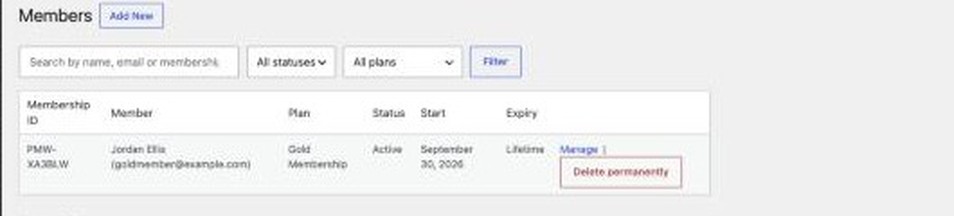
- Add New: manually assign a plan to a specific customer, choosing status and expiry (Lifetime or until a given date) without requiring a purchase. Useful for comping access, or for testing a plan before pointing real customers at it.
- Manage a member to edit their plan, status or expiry, add an internal note (optionally emailed to the member), and view their full access history.
- Pause / Resume / Revoke a membership, or delete the record entirely.
Import / export
- Export CSV: exports every member to a CSV file.
- Import CSV: imports members from a CSV file with columns
user_email,plan_name,status,expiry_date(formatYYYY-MM-DD; leave blank for lifetime).
Vouchers
Pro Memberships → Vouchers lists every voucher issued from a qualifying order, searchable by code or purchaser email and filterable by status. Vouchers are how membership is granted for plain one-time orders — see the User Guide for why. From this screen you can see who purchased each voucher, whether and by whom it’s been redeemed, and resend the voucher email if a code has gone astray.
Member-facing pages
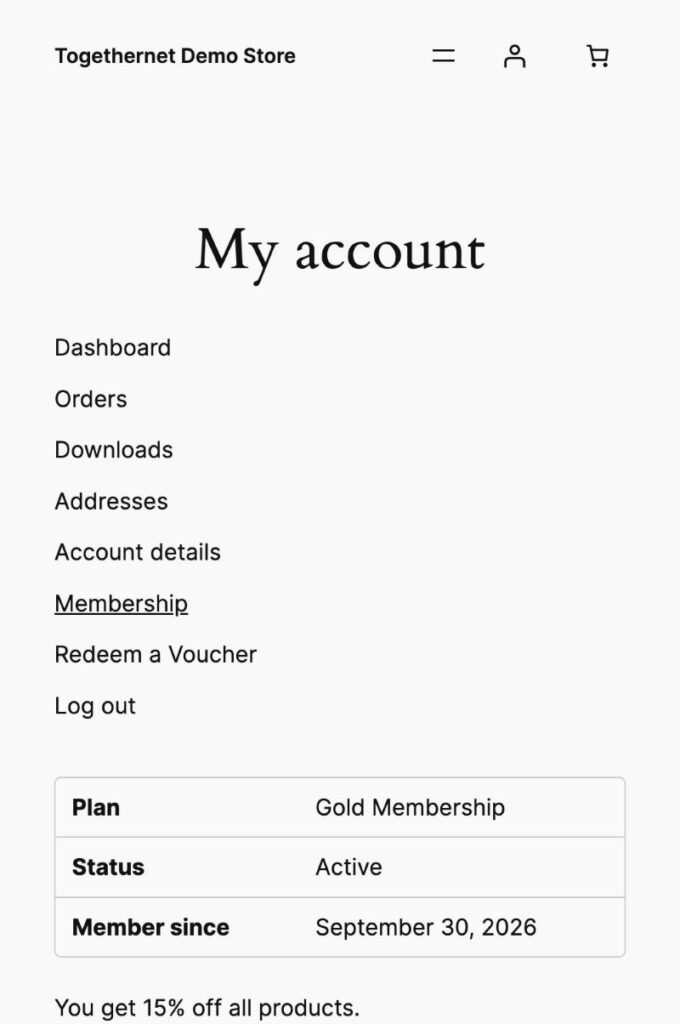
Two sections are added automatically to My Account, forming a simple members’ area:
- Redeem a Voucher: where a customer enters a voucher code to activate a membership on their own account.
- Membership: shows the customer’s current plan, status, start date, renewal/expiry date, any discount and free shipping they’re entitled to, and the content included in their membership.
Next step
See the Practical Tips guide to learn how to get the best out of Pro Memberships for WooCommerce.