
Daily Briefing
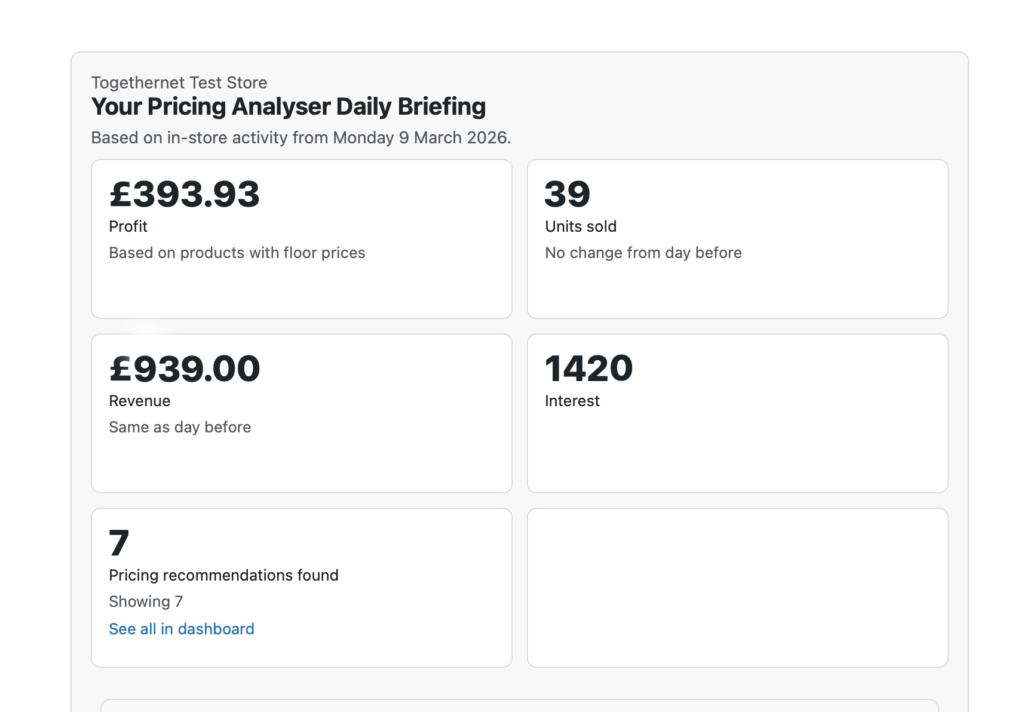
The Daily Briefing is Pricing Analyser’s overnight summary email. It is designed to give store owners a concise, practical update on recent store activity and pricing opportunities without needing to open the dashboard first.
Rather than sending a generic report, the briefing focuses on the information most useful for day-to-day pricing management.
What the Daily Briefing is for
The briefing is intended to help you:
- see how the store performed recently
- spot pricing opportunities worth reviewing
- keep track of strong and weak product performance
- stay engaged with store activity on a regular basis
For merchants who do not log into the dashboard every day, it provides a practical summary of what changed and what may need attention. In essence, the briefing helps answer the question: “What should I look at this morning?”
Where to configure it
Go to WooCommerce → Settings → Pricing Analyser.
The Daily Briefing section allows you to configure:
- whether the email is enabled
- who receives it
- when it is generated
- when it is delivered
- which categories should be emphasised, if required
How it works
The Daily Briefing is generated overnight and then delivered later at the configured time.
This separation exists so that the store activity can be processed first and the completed email can be sent at a more useful time in the morning.
The briefing is based on in-store activity from the day just completed. Use it for suggestions on how to make today’s trading better than yesterday’s.
What the briefing includes
The exact contents may vary depending on your configuration, but the briefing can include:
- units sold
- revenue
- interest
- profit, where floor-based margin calculation is enabled
- number of pricing recommendations found
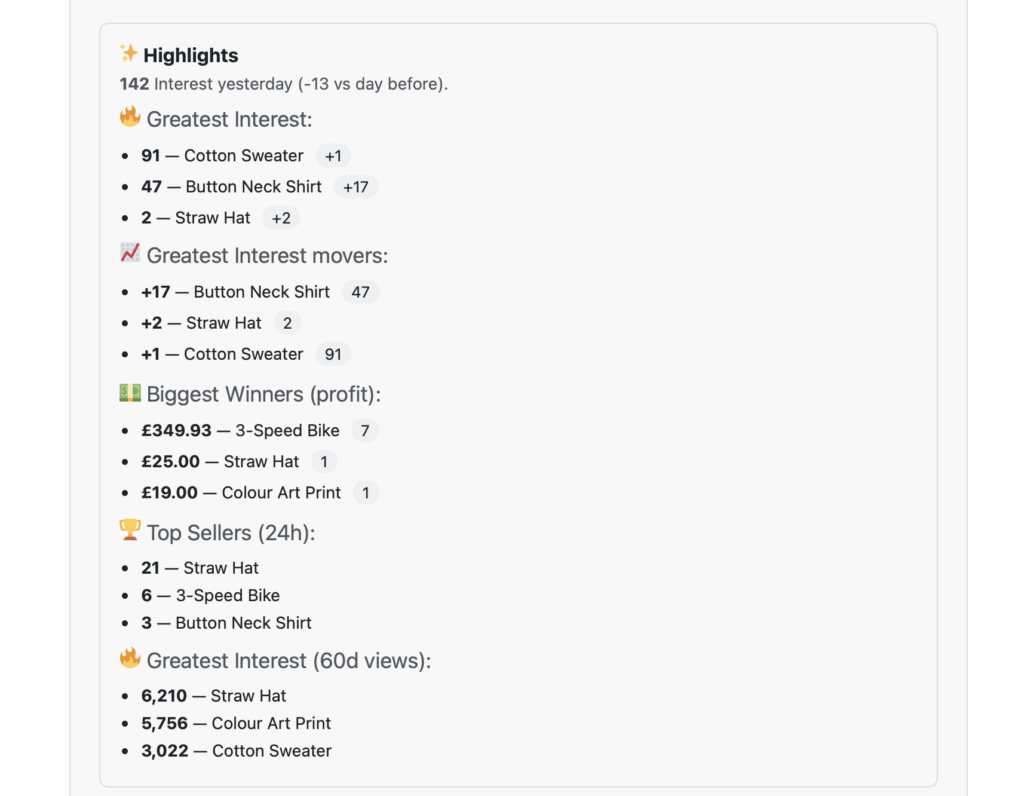
- highlight products or notable activity
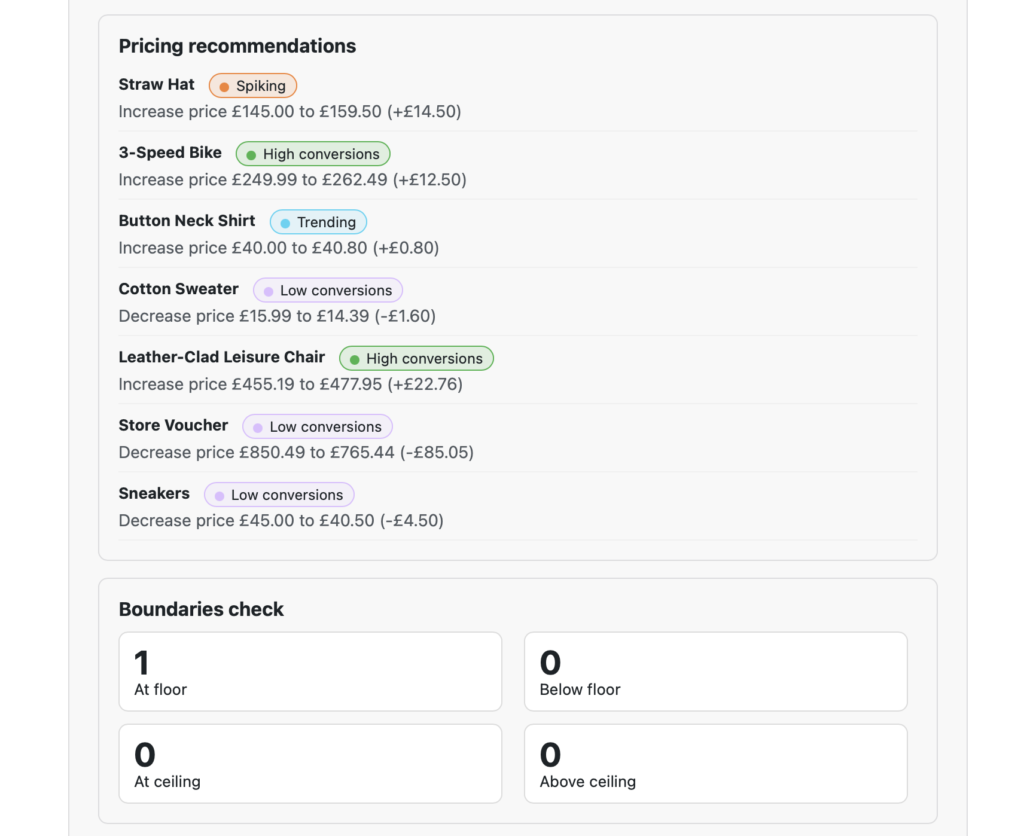
- pricing recommendations
- greatest interest products
- top sellers
- biggest winners and losers, where margin calculation is available
- a boundaries check summary
The aim is to provide both a quick numeric summary and a set of practical items worth reviewing.
Greatest Interest and Top Sellers
The briefing can highlight products with the strongest recent interest and products with the strongest recent sales performance.
This helps draw attention both to products attracting customer attention and to products already converting strongly.
These are often useful lists to compare. A product with strong interest but weak sales may need a different response from a product with both strong interest and strong sales.
Winners and Losers
If floor prices are being used to calculate margins, the briefing can estimate product-level winners and losers based on recent sales and the relationship between selling price and floor price.
This is intended to provide a practical margin-based summary of where value is being created or lost, using the floor price as a proxy for buy cost.
Only products with floor prices are included in these calculations.
Pricing recommendations in the briefing
The briefing can include pricing recommendations identified by Pricing Analyser’s rules engine.
These recommendations are intended to surface products worth reviewing, not to replace judgement. The dashboard remains the best place to inspect the supporting detail before applying changes.
Boundaries check
The briefing can also include a simple boundaries check showing how many products are:
- at floor
- below floor
- at ceiling
- above ceiling
This is useful for keeping an eye on pricing discipline across the catalogue.
Recipients
You can send the briefing to one or more configured recipients.
This makes it suitable not only for a store owner, but also for a manager or team member responsible for pricing review.
Category focus
If needed, the briefing can be configured to focus on selected categories rather than the full catalogue.
This is useful for merchants who manage a large catalogue but want the email to remain tightly focused and readable.
Test briefing
The settings page includes a test action so that you can send the briefing immediately to the configured recipients.
This is useful when:
- checking the current layout
- reviewing the current content mix
- verifying delivery
- confirming that recipients are correct
How to use the briefing effectively
The Daily Briefing works best when it supports, rather than replaces, the dashboard workflow.
A sensible approach is:
- use the briefing to spot what changed
- use the dashboard to inspect products in detail
- apply changes from the dashboard once reviewed
In other words, the briefing is ideal for surfacing priorities, while the dashboard remains the place for detailed review and action.
Best practice
- keep the recipient list tight and relevant
- choose a delivery time that fits your working day
- enable it once rules and boundaries are meaningfully configured
- use it to highlight exceptions and opportunities, not just to review headline numbers
Next step
Next, see Practical Tips for advice on using the plugin effectively over time.