
Bulk Utilities
The Bulk Utilities tools are designed to help you make controlled pricing changes across multiple products without editing each product individually.
These tools are especially useful when you need to apply broad commercial decisions across a category, product range or the whole store.
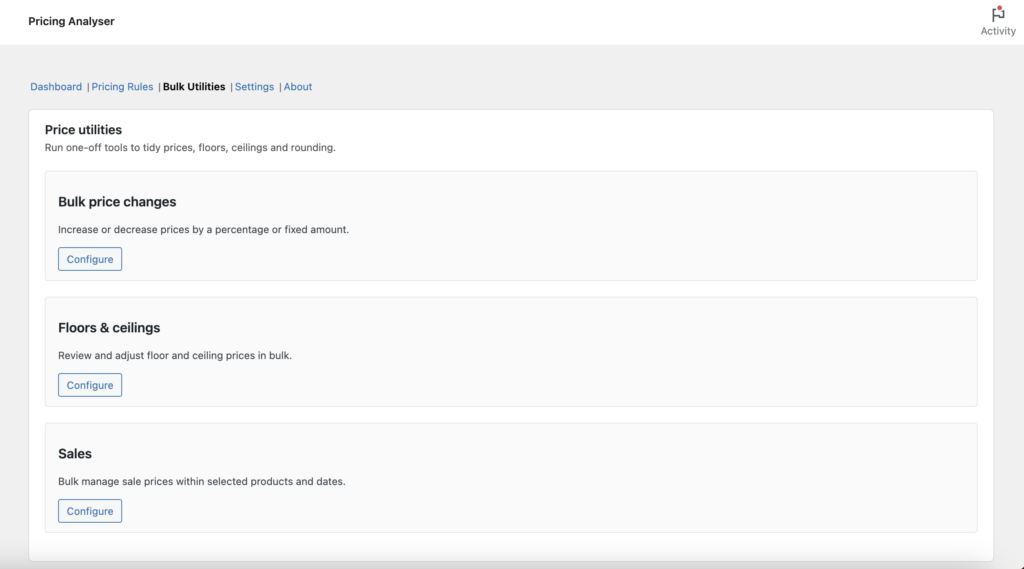
Where to find Bulk Utilities
Go to WooCommerce → Analytics → Pricing Analyser and open the Bulk Utilities section.
This area contains one-off tools for working with prices, sales, floors, ceilings and rounding.
What Bulk Utilities are for
Bulk Utilities are intended for tasks such as:
- raising or lowering prices across a group of products
- creating, changing or cancelling sales in bulk
- setting or adjusting floor and ceiling prices
- applying rounding to existing prices or boundaries
- correcting products that sit outside their intended floor or ceiling range
They are operational tools rather than rule-based recommendations. In other words, they allow the merchant to make a deliberate change across a defined scope.
Bulk price changes
The bulk price tools allow you to increase or decrease prices using either a percentage or a fixed amount.
You can choose the scope of the change, such as:
- all products
- selected categories
- other supported filters within the utility
When making a bulk price change, you can also control how floor and ceiling pricing should be treated and whether rounding should be applied.
Typical uses for bulk price changes
- applying a store-wide seasonal price increase
- reducing prices across a slow-moving category
- making a controlled margin adjustment across a range
- cleaning up existing prices using rounding rules
Bulk sales management
The sales utility allows you to manage sale prices across multiple products and dates.
Depending on the action selected, you can:
- cancel existing sales
- change discounts on existing sales
- create new sales for selected dates
- set end dates
- extend existing sales
- shorten existing sales
This is useful when you need to run or adjust promotional activity across a group of products without editing each one individually.
Scope and date selection
Bulk sales management supports scope selection so that you can limit changes to the part of the catalogue you actually want to affect.
This is important because promotional changes are often category-specific or date-specific rather than catalogue-wide.
Floors and ceilings
The floors and ceilings utility allows you to review and adjust product boundaries in bulk.
Typical actions include:
- clearing all floor prices
- clearing all ceiling prices
- setting floors or ceilings to a fixed value
- adjusting floors or ceilings by a fixed amount
- applying rounding to existing floors and ceilings
- fixing products that currently sit below floor or above ceiling
This is useful when setting up Pricing Analyser for the first time or refining your pricing boundaries over time.
Working with below-floor and above-ceiling products
Bulk Utilities can also help correct products that already sit outside the intended pricing range.
For example, you may choose to:
- bring the floor down to the current price
- raise the product price up to the floor
- bring the ceiling up to the current price
- lower the product price down to the ceiling
These options are useful when introducing floor and ceiling pricing to an existing catalogue.
Rounding tools
Rounding can be applied as part of bulk actions so that updated prices and boundaries remain visually clean and commercially sensible.
This is particularly useful when applying percentage-based changes that would otherwise produce awkward price endings.
Preview changes
Where available, use the preview step before applying a bulk action.
This allows you to check the effect of the action before committing it, which is especially important when working across large parts of the catalogue.
Best practice when using Bulk Utilities
Bulk tools are powerful, so they are best used carefully and deliberately.
A good working approach is:
- choose a narrow scope first
- preview the effect if a preview is available
- check how boundaries and rounding will behave
- apply the action to a controlled subset before using it more widely
This is particularly important when changing sale prices or boundary values across many products.
How Bulk Utilities differ from Pricing Rules
Pricing Rules are designed to generate product-specific recommendations based on performance data. Bulk Utilities are different: they are manual operational tools for making one-off changes across multiple products.
In practice, many merchants will use both:
- Pricing Rules for ongoing pricing guidance
- Bulk Utilities for larger planned adjustments
Typical scenarios
Bulk Utilities are especially useful for scenarios such as:
- running a category-wide promotion
- adjusting prices to reflect supplier cost changes
- setting initial floors and ceilings across an existing catalogue
- normalising price endings after manual import or editing
Next step
Next, see the Daily Briefing guide to understand how Pricing Analyser summarises store activity and pricing opportunities by email.